Status pages
Branded public status pages built from your uptime and cron monitors, with incident updates, scheduled maintenance and subscribers, so customers know what's happening before they ask.
 Hosted in the EU
GDPR-friendly by design
Core monitoring data stays in the EU
01
Pick the uptime and cron monitors to show, group them into sections and give them public names
02
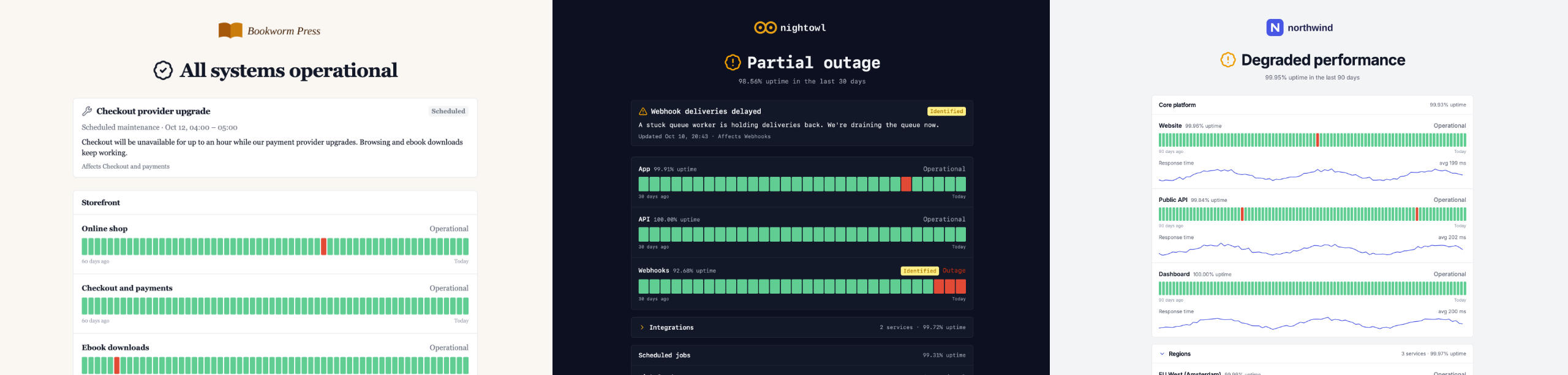
Brand the page with your logo, colors, theme and font, and watch it in a live preview as you edit
03
The page follows your monitors: an overall status line, and history bars built from confirmed incidents
04
Post incident updates and schedule maintenance; subscribers hear about it by email or feed

Builder and branding
- Group monitors into titled sections, optionally collapsible, and reorder them by drag and drop. Each monitor can have a public name, so internal names never show.
- An uploaded or hosted logo, a favicon, light or dark theme, accent and background colors, and a sans-serif, serif or monospace font. Shared links preview with your title, description and logo.
- A live preview renders the real page from unsaved changes. On Pro and Team you can remove the "Powered by WatchCat" footer.
Status and history
- The top of the page answers "is it working?" from the page's monitors: operational, degraded, partial outage, major outage or under maintenance.
- Daily history bars cover 7 to 90 days, within your plan's data retention, and come from confirmed incidents rather than single failed checks.
- Optional uptime percentages for the whole page, each section and each monitor, and response time sparklines for uptime monitors.
Incidents and maintenance
- Incidents have a timeline of updates (investigating, identified, monitoring, resolved), the monitors they affect, and a permalink each. Past incidents stay in a monthly history.
- Scheduled maintenance is announced ahead of time and shown while it runs. Affected monitors read "Under maintenance" instead of turning the page red.
- Maintenance also mutes alerts for its monitors, and its downtime doesn't count against the page's uptime.
Subscribers, sharing and access
- Visitors subscribe by email with double opt-in and get every incident and maintenance update, with one-click unsubscribe. An Atom feed covers the same updates without an address.
- A JSON status endpoint shaped like Statuspage's summary.json, an SVG status badge for READMEs, and an embeddable widget for your own site.
- Pages are public by default. On Pro and Team they can be unlisted, opened only through a share link, or protected with a password.
Why it matters
One source of truth for your status
- Built from the monitors you already have — no second tool to keep in sync
- Uptime and cron monitors on one page — scheduled jobs are part of your service too
- History from confirmed incidents — a single blip doesn't paint a day red
- Everything is in the REST API and MCP server — an agent can build the page from your brand files
Use cases
Typical use cases
- A SaaS product that wants one link to send customers during an outage
- An agency running client sites, with a branded page per client
- An internal platform team sharing service health behind a password
Start monitoring for free
5 monitors free · no credit card required